
Ludo Good Game Download and Installation
Ludo Good Game is a gaming platform specifically designed for the Pakistani audience. It offers a great variety of games, like slots, cards, skills, and multiplayer games. Users can play these games and win rewards. These winnings can also be withdrawn to their digital bank wallets. To play this game, you have to download and install the game on your Android device. The process of downloading Ludo Good Game is similar to any other Android app. You need two things to install Ludo Good on your Android device. First, download the APK file from our official website, then grant the permissions on your phone to install the app. This article covers the details of downloading and installing the Ludo Good App.

Device Specification Requirements
Ludo Good Game is a lightweight yet very responsive app. It doesn’t need a powerful phone, so it runs on a majority of Android phones, covering a wider audience in Pakistan.
Storage Space
The size of the Ludo Good Game APK file is 20 MB, and after installing all its packages and everything, it consumes around 100 MB of your device storage. To avoid any errors and be on the safe side, make sure you have at least 300 MB of free storage on your phone.
RAM Requirements
The game is lightweight, and it only requires 1 GB of RAM to operate. This way, many users who still use their old phones will be able to install Ludo Good on their devices. If your device has more RAM, the gameplay will be smoother, more stable, and avoid any lags.
Android Version
If your Android version is 5.0 or above (which most have today), you can install Ludo Good Game on your phone. So if you are still using a phone from 2015, it is highly likely that you will be able to download and install the game.
Ludo Good APK File Download
Now, if the previous criteria is met, you need to download the APK file of ludogood. Visit the official website of Ludo Good Game and then tap the download button. You can use any browser of your liking, but we recommend Google Chrome for its safety features. Once you tap the download button, the browser will prompt you to confirm the download. Allow the browser to download the file. Now the download progress bar will be shown in the downloads section of the browser. Once the download is completed, you can either start the installation by opening the downloaded file there, or you can go to the downloads on your phone and find the APK file there as well.
Permission Needed to Install Ludo Good App
By default, installation from browsers like Chrome is disabled for security reasons. Since you downloaded the APK from the official site, it is safe to install it. To install files from the Chrome browser, you need to allow installation from unknown sources in your phone settings. Depending on your Android version, follow the steps that apply to you.
Android 8 and Above
Android 7 and below
Installing the Ludo Good App
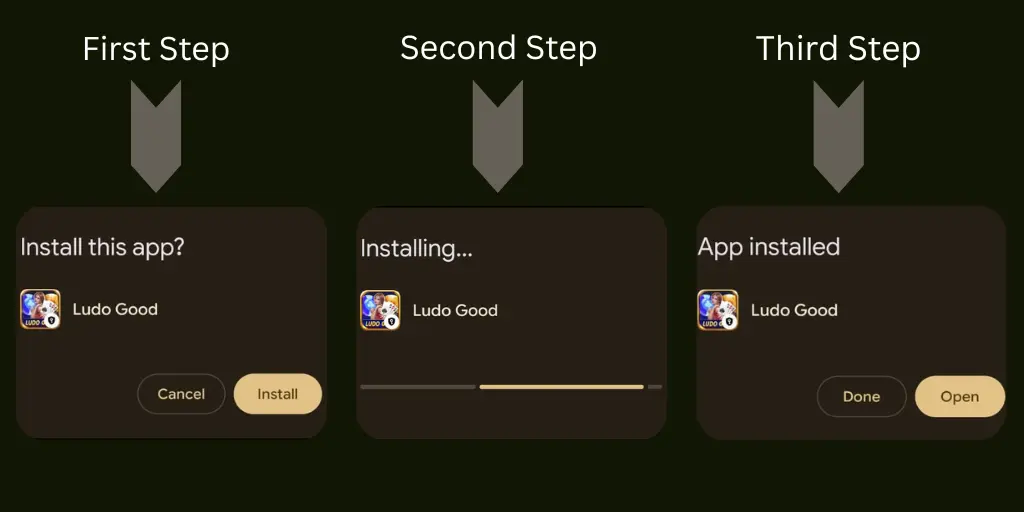
If you have followed the previous step, you are set to install the Ludo Good Game on your device. You can run the APK file either from the download section of your browser or from the default download location on your phone’s memory. Just click the downloaded APK file and your game should start installing. Depending on your phone, it will take around 10 – 60 seconds to complete. Once completed, you will see the open button on screen. Now you are all set to use the Ludo Good game.
Common Downloading Errors
Downloading an APK file from a website using a browser is simple. However, some issues can happen during the download process. Understanding what these issues are and how to fix them saves your time and energy.
Slow or Stuck Download
One common error that might occur is when the download is stuck or is very slow. This is often caused by slow or unstable internet. It can also occur when the internet is cut off for some time. If this error occurs to you, then please cancel the entire download first, and then connect to a fast internet connection (preferably wifi). Now downloading the APK again will solve the problem.
Insufficient Storage
As we already mentioned about the requirements of the game, you need to have at least 300 MB of free space available to be able to successfully download and install Ludo Good Game. The size of the APK is just 20 MB, and yes, you can download the APK if you have more than this memory. However, when you install it requires additional storage to install its packages.
Unsupported File format
When the internet connection is not stable, sometimes the APK will be downloaded, but it may be corrupted. If this happens to you just delete the current file and go to the homepage of the website and download the file again with a better internet connection. This will be your issue.
Update the LudoGood Game
It is always recommended to update to the latest version of the game. With every update, the game introduces new features, updates the UI, and fixes any bugs it might have. You can update the app manually by visiting the website and checking for the latest version. If a new version is available, download the latest APK file and then install it.
You can also enable auto-updates within the game. Go to your game settings and select the auto-update feature. This way, the game will automatically look for updates on a daily basis. If there is an update available, it will automatically download and install the update.
FAQ’s about Ludo Good Download and Installation
Is it safe to download Ludo Good Game APK?
Yes, if you download it from our site, then it is totally safe. Avoid using any modified APK versions.
Why is my APK file not being installed?
It could be because your Android version is older than 5.0, or you don’t have enough space on your phone.
Can I install Ludo Good Game on any Android device?
Yes, it works on any Android device just make sure it fulfills the requirements mentioned in this article.
Do I need an internet connection to play the game?
Yes, you do need to have a stable internet connection while playing the game.
Will my game progress be lost after installing or updating the APK?
No, your progress remains the same just the app will be updated.
Conclusion
Ludo Good is a lightweight and simple game, which you can download from our website. Compare your phone specs with the game requirements to see whether it is available for your device. If your phone meets the criteria, download the APK from our official site and then follow the installation steps.
If you face any difficulty in this process, make sure to read the common issues and their fixes. Make sure to update your app to enjoy the latest features, improved performance, and smoother gameplay. If you encounter any issue regarding installation or download, use our contact page to reach out to us.