
Withdrawing Money from Ludogood | EasyPaisa & JazzCash
Ludogood has been the go-to game for Pakistani users because it offers a wide variety of online games. It is also known for its simple and engaging interface. The Ludo Good app works well on low-end phones, hence targeting a wide audience in Pakistan. By playing games, users can win real money. This way, they can generate a side income.
These winnings can be used to play more games, or users have the option to withdraw them into their digital wallets. Users enjoy this hassle-free ludogood withdrawals method of cashing out their funds with just a few taps on the screen. As a result, more people are downloading the Ludo Good APK and transitioning towards the Ludogood game.
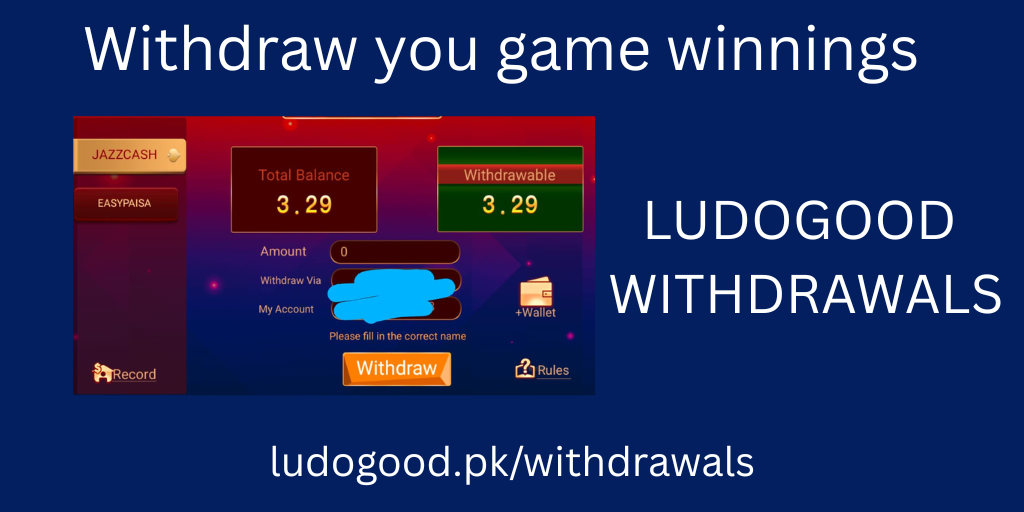
Available Ludogood Withdrawals Methods
To be able to withdraw your funds from Ludogood, you first need to know the available methods in the game. Ludo Good Game comes with the most popular digital wallet options in Pakistan.
EasyPaisa:
EasyPaisa was the first digital wallet introduced in Pakistan, and since then, it has built a strong reputation. The Pakistani audience trusts this wallet, and hence it is available in the Ludogood game as a withdrawal method.
JazzCash:
JazzCash is comparatively new, yet it matches the reputation of EasyPaisa. People mostly use it for daily payments, mobile top-ups, and bill payments. Due to its simplicity and fast transactions, it is widely used by freelancers to receive payments from international clients. All these features are the reason Ludo Good has opted for JazzCash as one of its withdrawal methods.
Step-by-Step Withdrawal Process
- First, make sure you have downloaded and installed the latest version of the Ludo Good APK.
- Create a game account. This way, you will have a track of your withdrawal transactions.
- Now navigate to the withdrawal button on the bottom left of the home screen.
- For the first transaction, you need to add your wallet.
- Select EasyPaisa or JazzCash, and then tap the +wallet button.
- Enter the account name, account number, and then set a password.
- Use a strong password and remember it.
- Now enter the amount you want to withdraw, select the wallet you want to withdraw into, and tap the withdraw button.
You have successfully initiated a withdrawal request. It usually takes about 1 to 10 minutes for your funds to be added to your account. You can check the status of your transaction by tapping the record button. Check your EasyPaisa or JazzCash account to confirm you received the correct amount. If anything goes wrong, you can contact support, which is available 24/7 in the Ludogood app.
Withdrawal Limits
The amount you can withdraw from Ludogood is limited. You can easily withdraw your money within these limits. The limit depends on the withdrawal method you are using. Details about the limits of each method are discussed below.
Limit Using EasyPaisa:
With EasyPaisa, users can withdraw a minimum of 10 PKR and a maximum of 50,000 PKR. This is the game limit, not your digital wallet limit. So always check the limit of your EasyPaisa account first, and then you can withdraw 10 to 50,000 PKR from your game account. Note that this is the limit for a single transaction, and you can carry out multiple transactions each day.
Limit Using JazzCash:
When you choose JazzCash as your withdrawal method, things change slightly. With JazzCash, you can withdraw a minimum of 100 PKR and a maximum of 30,000 PKR. Again, this is the limit of the game, so make sure your JazzCash account limit can handle the amount you want to withdraw. You can perform multiple transactions in a single day.
| Withdrawal Method | Minimum | Maximum | Multiple Transactions |
|---|---|---|---|
| EasyPaisa | 100 PKR | 50,000 PKR | Yes |
| JazzCash | 100 PKR | 30,000 PKR | Yes |
Common Withdrawal Problems and Their Solutions
Most of the time, there are no issues with withdrawing money from the Ludo Good Game. Occasionally, users face minor issues during transactions. Most of these issues are common and can be easily resolved. Here are some common problems and their solutions.
Pending Withdrawal Request:
It usually takes about a minute, and all the way up to 10 minutes, for a transaction to complete. However, it can take longer as well, depending on the servers and load. Always check the status of your transaction. If the status is pending, then there is no issue; you just have to wait a bit longer. If the status shows successful but the amount is not in your account, register a complaint. If the transaction fails, your amount will be added back to your game account. If it is not added back, you can file a complaint by contacting customer support.
Incorrect Wallet Details
This is the simplest but most important part. When you enter even one digit incorrectly in your account number, the possibility of it going to another person is high. In such cases, the withdrawn amount cannot be reversed. The only thing you can do is contact the person holding that account to return your amount. Make sure you selected the correct withdrawal method and entered the corresponding account number. Do not select EasyPaisa and provide a JazzCash account number, or vice versa. This is a very common mistake, so always pay attention while adding your account number and double-check it.
Exceeding Limit:
All accounts have their receiving and sending limits. Always check the receiving limit of your wallet, both daily and monthly. Enter an amount within your account limits so that the transaction completes without any error. If the amount entered exceeds your limit, the transaction will most probably fail, and the amount will be added back to your game account. If anything goes wrong, contact support.
Tips for Smooth Withdrawals
The steps involved in withdrawing your winnings from your game account into your digital wallet are simple. Yet, we compiled some tips to make your transactions even smoother.
- Always double-check the wallet details you entered.
- Make sure you choose the correct withdrawal method and use the corresponding account number.
- Ensure that your internet connection is stable. If you have Wi-Fi, even better.
- Double-check the amount you entered before tapping withdraw. If you withdraw more than you intended, you can always deposit the extra amount back.
- If the transaction somehow fails, check your game account. The amount is usually added back to your game balance.
- Check the limits of your EasyPaisa and JazzCash accounts. Do not withdraw more than your account limit allows.
- Use the in-app support if you encounter any issues while withdrawing funds.
Frequently Asked Questions
How long does a withdrawal take on Ludogood?
Most withdrawals are processed within 1 to 10 minutes. In rare cases, it can take longer depending on server load. You can track the status of your transaction using the record button in the Ludo Good app.
Can I withdraw to both EasyPaisa and JazzCash from the same Ludogood account?
Yes. You can add multiple wallets to your Ludo Good Game account and choose which one to withdraw into each time.
What happens if my withdrawal fails?
If a transaction fails, the amount is added back to your game balance. If it does not appear in your game account, contact the 24/7 customer support through the app.
Is there a daily withdrawal limit?
The limits mentioned above are per transaction. You can perform multiple transactions in a single day, but keep in mind the daily limits of your EasyPaisa or JazzCash account as well.
Conclusion
Ludogood comes with a large variety of online games, which attracts Pakistani people to choose it as their go-to platform. Players can earn money by competing in games, collecting rewards and bonuses, and withdrawing their winnings into their JazzCash or EasyPaisa account. Withdrawing money from the Ludo Good Game is simple and fast, making it convenient for players to easily cash out. Whether you are using the Ludo Good APK for the first time or you are a regular player, the withdrawal process remains straightforward. If something goes wrong, the 24/7 customer support is there to assist players and resolve their queries. Always check the disclaimer before using this game.